Faculty: Assess Student Submissions in SLL
TABLE OF CONTENTS
- What is Student Learning & Licensure (SLL)?
- Link to an SLL Activity from your myLesley/Blackboard Course
- Assess Activities in SLL
- Additional Resources and Support
What is Student Learning & Licensure (SLL)?
Student Learning & Licensure (SLL) allows faculty to grade and assess student work on key assignments. Assessment data can then be used for accreditation and program improvement.
Refer to the Student Learning & Licensure (SLL) Overview and FAQ support article for more information.
Link to an SLL Activity from your myLesley/Blackboard Course
In order for your students to submit their SLL activities, you will need to create a link to a specific SLL activity from your myLesley/Blackboard course. This link will log your students into SLL and take them directly to their assignment. There is no additional login for your students at this time.
Refer to the Faculty: Link to an SLL Activity from your myLesley/Blackboard Course support article for detailed instructions.
Assess Activities in SLL
Once students have submitted their activities, you will assess them within SLL.
You may access SLL by clicking the link in your myLesley/Blackboard course or going to Lesley University's Watermark login page and logging in with your Lesley credentials.
From the main Student Learning & Licensure page, click on the In-Progress tab to locate your course and begin assessing students.
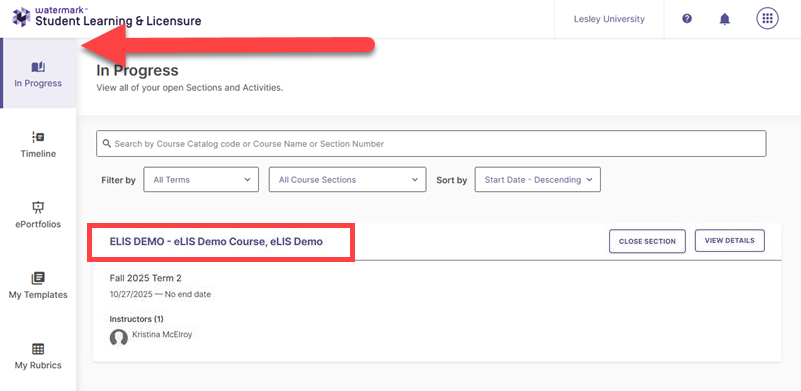
Refer to the Assessing Activities in SLL support page for step-by-step instructions or watch the Assessing Activities in SSL tutorial video for an overview of the process.
Additional Resources and Support
Student Learning & Licensure resources and documentation:
- Faculty: Student Learning & Licensure (SLL) Overview and FAQ
- Faculty: Link to an SLL Activity from your myLesley/Blackboard Course
- Students: Submit an Activity (Assignment) in Student Learning & Licensure
If you need assistance connecting your SLL activity to your myLesley/Blackboard course, reach out to elis@lesley.edu.